Tuesday, May 29, 2007

Stream Me a River

Recently, I have uploaded new open source unit to my web pages - GpStreams. It contains a mix of TStream descendants, enhancers and helpers I have written over the last few years.

Stream Window

TGpStreamWindow is a TStream descendant which provides a window into another stream.

Sometimes you want to pass just a part of a stream to some method. For example, you have a stream containing a header and data and you want to pass it to a method that expects only data. If you can't change the method in question to ignore the header (maybe it's not a method you have written), then you would normally have to copy the data part to another stream and pass the copy to that method.

Alternatively, you can wrap the stream into TGpStreamWindow and set limits to exclude the header, then pass the TGpStreamWindow instance to the method. TGpStreamWindow doesn't copy data but overrides Read, Write, and Seek methods.

Relevant part of the interface:

  TGpStreamWindow = class(TStream)
public
constructor Create(baseStream: TStream); overload;
constructor Create(baseStream: TStream; firstPos, lastPos: int64); overload;
procedure SetWindow(firstPos, lastPos: int64);
property FirstPos: int64 read srFirstPos;
property LastPos: int64 read srLastPos;
end; { TGpStreamWindow }

Example:

procedure DoSomethingWithData(dataStream: TStream);
begin
//...
end;

procedure ProcessStream(headerAndData: TStream);
var
dataStream: TGpStreamWindow;
begin
// first 512 bytes contain the header - ignore!
dataStream := TGpStreamWindow.Create(headerAndData, 513, headerAndData.Size - 1);
try
DoSomethingWithData(dataStream);
finally FreeAndNil(dataStream); end;
end;

Streamed Memory Buffer


TGpFixedMemoryStream is a TStream descendant which provides  streamed access to a memory buffer. In a way, it is similar to the TStringStream except that the underlying data is stored in a constant-size memory buffer.


Interface:

  TGpFixedMemoryStream = class(TStream)
public
constructor Create; overload;
constructor Create(const data; size: integer); overload;
constructor Create(const data: string); overload;
procedure SetBuffer(const data; size: integer);
property Memory: pointer read fmsBuffer;
end; { TGpFixedMemoryStream }

Stream enhancers


TGpStreamEnhancer class contains various small helpers for the TStream class. Because of the technology used (class helpers), it can only be used in D2005 and newer. Also because of the technology used, TGpStreamEnhancer extends functionality of TStream and all descendant classes.


TGpStreamEnhancer contains:


  • Big endian (Motorola) readers/writers - Methods to read/write numbers in Motorola (big endian) format.
  • Little endian (Intel) readers/writers - Methods to read/write numbers in Intel (little endian) format.
  • Tagged readers/writers - Methods to read/write tagged data.
  • Text file emulator - Write(string) and Writeln.
  • Other helpers - Save/load stream to/from file, format stream as string or hex string, empty the stream.

Stream Wrappers


Two stream wrappers are included. Both are implemented with interfaces and use the fact that Delphi automatically destroy interfaces when they go out of scope to achieve some 'automagic' functionality.


AutoDestroyStream automatically destroys a stream, when the wrapper goes out of scope.


For example, ProcessStream example above could be rewritten with AutoDestroyStream to:

procedure ProcessStream(headerAndData: TStream);
begin
// first 512 bytes contain the header - ignore!
DoSomethingWithData(AutoDestroyStream(
TGpStreamWindow.Create(headerAndData, 513, headerAndData.Size)).Stream);
end;

KeepStreamPosition wrapper automatically resets stream position to the original value when wrapper is destroyed.


Other Utilities


Few 'unclassified' utilities are also included in the GpStreams unit.


SafeCreateFileStream is a wrapper around TFileStream.Create that maps exception into function result.


DestroyFileStreamAndDeleteFile destroys TFileStream and deletes the file that was used as a stream source.


Technorati tags: , , , ,

Monday, May 28, 2007

New GpLists and other updates

It's been quite some time since I last updated my Delphi freeware stuff so here's the list of latest changes:

DSiWin32 1.24

GpLists 1.26

  • Added TGpReal class.
  • Added TGpCountedIntegerList class.
  • Added TGpCountedInt64List class.
  • Added CustomSort method to the TGpIntegerList and TGpInt64List classes.
  • Added EqualTo method to the TGpIntegerList class.
  • Added ValuesIdx to the TGpObjectMap class.
  • Compiles with Delphi 6 again. Big thanks to Tao Lin and Erik Berry for reporting, diagnosing and fixing the problem.
  • Older articles: Sir! Do you need a list? Cheap, just for you!

GpHugeFile 5.01a

  • Fixed a bug where internal and external file pointer got out of sync in buffered write mode.
  • Exposed underlying file's handle as a Handle property from the TGpHugeFileStream class.
  • Added support for asynchronous writing.
  • Older articles: GpHugeFile 4.0

GpStructuredStorage 1.12a

GpSync 1.20

  • New class TGpCircularBuffer.

GpStuff 1.05

  • Newly published on the web, contains some small utilities. See the source.

GpStreams 1.13

  • Collection of stream helpers, stream descendants and stream utilities. I'm preparing a more detailed description which should be published soon.

Previous updates: Bulk update

Technorati tags: , , ,

Friday, May 11, 2007

Case .. else raise, again

Yesterday I used a really bad example which got most of my readers thinking about how most of the code could be optimized away. As that was not the idea behing my post, I decided to give a better example. This one is straight from the production code:

case mafWorkerOwner.PostToThread(MSG_AF_SCHEDULE_VIDEO, clonedBuffer) of
mqpOK:
Result := ClearError;
mqpTimeout:
Result := SetError(ERR_MXFFILTER_THREAD_TIMEOUT,
'Timeout while sending message to the worker thread');
mqpQueueFull:
Result := SetError(ERR_MXFFILTER_QUEUE_FULL,
'Cannot send message to the worker thread - queue full');
else raise Exception.Create('TMXFAsyncFilter.ScheduleVideo: Unexpected PostToThread result');
end; //case PostToThread

Am I making more sense now?


Technorati tags: , ,

Thursday, May 10, 2007

Case .. else raise

I believe in safe programming. In my book that means that my programs should fail whenever I do something wrong. Even better - they should automatically detect my future stupidities and warn me when I make them.

For example, take this completely made-up example:

type
TEnumeration = (enOne, enTwo, enThree);

function DoSomethingWith(enum: TEnumeration): integer;
begin
case enum of
enOne: Result := 1;
enTwo: Result := 2;
enThree: Result := 3;
end;
end;

Pretty typical, huh? We'll, I won't write it like that. Never.


Let's say that in the future TEnumeration gets extended to include enFour. Now you have to hunt all places where it is used and adapt the code. Maybe you'll miss one or two, maybe not. I usually do :(


At least in fragments like the one above, a little planning can save you hours of debugging. By adding just one line, you can be automatically reminded that you failed to update the code at this very place:

type
TEnumeration = (enOne, enTwo, enThree);

function DoSomethingWith(enum: TEnumeration): integer;
begin
case enum of
enOne: Result := 1;
enTwo: Result := 2;
enThree: Result := 3;
else raise Exception.Create('DoSomethingWith: Unexpected value');
end;
end;

(For commenters: Yes, I'm aware that this is simply a precondition check.)


[

Technorati tags: , ,
]

Monday, April 23, 2007

When changing semantics, make sure that existing code will break

This is something I learned the hard way - by many times making the same mistake.

Let's say you have a function AdjustBitrate that accepts one parameter representing new bitrate in kb/s (whatever that may mean).  It's prototype is simple:

procedure TBaseClass.AdjustBitrate(newBitrate_kb_s: integer);

Due to a changed requirements, you have to redesign this function so that it will take not a new bitrate, but a bitrate increase (relative to the existing bitrate). What do you do?

procedure TBaseClass.AdjustBitrate(bitrateIncrease_kb_s: integer);

Wrong! Just the mistake I was talking about. You changed the semantics of a method without breaking existing code!


Just think of what is your next task - you have to find all places where AdjustBitrate is called and fix them to pass bitrate increase as a parameter instead of target bitrate. Without the help of the compiler you'll surely miss one or two. True, Ctrl-Shift-Enter (or Search, Find References) in new IDEs can help a lot, but it is still not perfect. It won't show you other projects by your colleagues, which are unaware of this change in the semantics. Or even worse - what if this is a part of some 3rd party library that many other programmers are using? How will you force them all to update?


The answer is simple - your change must break existing code. In this case, the simplest solution is to rename the method:

procedure TBaseClass.AdjustBitrateBy(bitrateIncrease_kb_s: integer);

That's all. The compiler will warn all programmers using your code that AdjustBitrate does not exist and then they'll find AdjustBitrateBy and notice the change in parameters (hope, hope).


Sometimes you're completely sure that no code outside the current project can be using the method you're working on (maybe it is a private method). In that case, I usually rename the method (for example, Add becomes xAdd), fix all call sites for this method (compiler will report errors everywhere I'm trying to use Add), and then rename it back (xAdd -> Add).

[
Technorati tags: , ,
]

Friday, April 20, 2007

Using descriptive variable names

If I've learned something in my programming career, it is a fact that your coding style changes all the time. [Not all the time for the better, I have to admit - there was a weird phase when if..then..else alignment ... no, I'm not yet able to discuss this. Too scary.] It is not only alignment that is affected (hanging begin..end etc) but the way how you split stuff into classes, units, and methods, and how you name entities.

Recently I made a change in the latter. I'm a big fan of using long entity names (even my 'for' variables are usually named iSomething), but recently noticed that I cannot always pack enough meaning into a name. I was doing some DVB transport stream manipulations and noticed that most of the time entity names only conveyed half of their real-world semantics. For example, I had an originalBitrate variable but there was no way of telling if this bitrate is specified in bits per second, bytes per millisecond or maybe kilobits per second. Or I had a VideoStart property and I had no idea if it is specified in milliseconds or PCR units (basic time unit in transport streams) or even as a byte offset from the start of the transport stream. I had to look into my documentation or even into the code to see how the entity in question was initialized.

That was clearly Not Good and I needed a better way. I started decorating names with descriptive suffixes.

Nowadays I'm using originalBitrate_kb_s and VideoStart_PCR and I can immediately tell that former is stored in kilobytes per second and latter in PCR units. I'm using this approach any time that simple entity name is not enough to describe its contents. For example, I'm using _pct suffix when variable holds a percentage of something and _UTC when TDateTime field contents are stored not as a local but as an universal time and even _ref when a pointer/object variable is not an owner of some data but only holds and external reference to it.

While suffixes are good for documenting purposes they also improve the code readability. I can immediately tell that assignment bitrate_b_ms := someOtherBitrate_B_s is wrong and that someTime := otherTime_UTC is wrong or suspicious. I can even tell that the formula Result := base_PCR + MSToPCR(offset_B / bitrate_B_ms) makes some sense. [B] / [B/ms]  gives [ms], which MSToPCR somehow converts to [PCR] units which are then added to some base timestamp, also stored in [PCR] format. Check.

Decorators can be helpful, but still you should use them sparingly. Using a variable bitrate_kb_s_unverified_data_reported_from_external_dll is not such a good idea. Comments are still useful when you have to document that level of semantics. 

[
Technorati tags: , ,
]

Wednesday, April 11, 2007

The most important Delphi setting

I have my favourite Delphi setting. A setting that is not enabled by default, but which I always turn on. A setting that many developer's don't use and many can't live without. A setting that you should use. Always.

I'm not telling you which setting this is. Yet.

Look at this code fragment first.

  i := 1;                
while (s[i] <> s[i+1]) and (i < Length(s)) do
i := i + 1;
There is a problem in this code. Can you spot it?


This small fragment accesses s[Length(s) + 1], which is an undefined value and may even lie outside of allocated virtual memory and cause an Access Violation during program execution. This happens because of a simple bug - tests in the while loop should be reversed so that i < Length(s) proposition is tested first.

  i := 1;                
while (i < Length(s)) and (s[i] <> s[i+1]) do
i := i + 1;

The really big problem with this code is that Delphi doesn't report any error when you run it. At least with default settings it doesn't.


And now we came to my favourite Delphi setting - Range checking.


Select Project.Options and check Range checking.


Click OK and rebuild the project. Run it again.


See! Delphi can find such errors, it just needs a little motivation!


I strongly recommend to enable range checking for all new projects. Close all projects in Delphi, then select Projects.Default Options.Delphi for Win32 and check Range checking (in BDS 2006; instructions for other IDE versions may differ).


If range checking is so good, then why is it not turned on by default? I suspect that it was originally disabled because of speed issues on slow CPUs. Range checking can quickly add 10% to the execution time if your code uses string and array indices a lot. Nowadays this is hardly noticeable but by enabling range checking, old code may break in very interesting ways. Especially if it contains some range-related bugs ...


If you want to execute some time-critical code without range checking, you can put {$R-} before it (to disable rangle checking) and {$R+} after. Or, if you like more self-descriptive commands, {$RANGECHECKS OFF} and {$RANGECHECKS ON}. And please don't try to guess what the time-critical part of your program is, use a profiler.


Technorati tags: , ,

Friday, April 06, 2007

Sunday, March 25, 2007

Inside the Windows Vista Kernel

If you want to do serious (non-GUI :) ) programming on Vista, I heartily recommend following three-part series on Vista Kernel written by one-and-only Mark Russinovich:

Inside the Windows Vista Kernel: Part 1 (thread priority and scheduling, file-based symbolic links, canceling I/O operations)

Inside the Windows Vista Kernel: Part 2 (memory management, startup and shutdown, power management)

Inside the Windows Vista Kernel: Part 3 (reliability, recovery, security)

Friday, March 16, 2007

Delphi 2007 is here!

Delphi 2007 has gone gold and will be available for download soon (in some countries, it already is). Read more at Steve Trefethen's blog.

If you can't decide whether you want to buy it or not, check BetaBlogger blogs. We've written quite some words on D2007 (blogs are sorted alphabetically, posts chronologically):

(If I forgot to link anybody, it wasn't on purpose. Please post any additional URLs in the comments.)

Thursday, March 15, 2007

Default array properties - There Can Be Only One. Not!

I was in total awe today when I found out that there can be more than one default array property in a single class. And I thought that I know everything about Object Pascal!

I also come across a great way to use records and Implicit operator.

And what's the best - I learned both things in a single blog entry - Overloading array properties in Delphi/Win32! Recommended!

Monday, March 12, 2007

Glassy Delphi

In Fun with enumerators, part 5 I wrote

"Class helpers offer us a way to extend classes that we cannot touch otherwise. For example, they are used inside Delphi 2007's VCL to add glass support to TCustomForm (it was impossible to extend TCustomForm itself as D2007 is a non-breaking release)."

For all interested - Hallvard just published nice description of how glass support was added to the TCustomForm.

Sunday, March 11, 2007

Fun with enumerators

Boy, was this an interesting trip.

For the last six days I was writing a series of articles on Delphi enumerators, one day each. In some way, this was very similar to something else I like to do - writing magazine articles on computer-related topics. So similar that I planned this series exactly as I'm planning an article. In some other way, it was also very different. Later posts I adapted based on feedback from earlier ones. For example, Part 6 was not included in the original article outline. This topic came to my mind while I was reading reader comments. In a way, it was like working with a very eager editor who is checking every chapter immediately I'm finished with it. Or, if you want, it was similar to pair programming.

In a way, writing this series was more like writing a book. If that's so, I have something more to write - a table of contents. It will help new readers to read whole series or just find the part they are interested in. So without further ado, here is the

Table of Contents

Part 1 - Introduction

Contains a short introduction on Delph iterators (for..in statement) and describes Delphi support for iterator extensibility.

Part 2 - Additional enumerators

Shows how to add an additional enumerator to a class that already contains one.

Part 3 - Parameterized enumerators

This chapter takes Part 2 topic one level further by introducing enumerator parameters.

Part 4 - External enumerators

In this chapter you'll learn how to create enumerators without changing the class they are enumerating.

Part 5 - Class helper enumerators

Shows how to create additional enumerators using class helpers and how to use same technique to add enumerators to classes that don't have one.

Part 6 - Generators

The last chapter shows how to write enumerators that work on their own data, not on some external structure. It also includes full source code of a demo program and all enumerators described in the series.

Make sure you'll also read comments to those posts - some quite interesting ideas are hidden there.

[If you liked my articles, feel free to tell others about them. Thanks!]

Updated 2007-11-13

Hallvard Vassbotn posted interesting observations on enumerator performance in More fun with Enumerators.

Allen Bauer found a new use of the enumerator pattern in Stupid Enumerator Tricks - And now for something completely different.

Technorati tags: , ,

Saturday, March 10, 2007

Fun with enumerators, part 6 - generators

[Part 1 - Introduction, Part 2 - Additional enumerators, Part 3 - Parameterized enumerators, Part 4 - External enumerators, Part 5 - Class helper enumerators.]

This was a long and interesting trip but it has to end some day. And it will end today. Just one last small topic to cover ...

in Part 4 I mentioned that we could abuse enumerators to the point where they are not working on any external structure. My example for such generator which is providing its own enumeration data was

for i in Fibonacci(10) do
Writeln(i);


and I promised to show you how to write it.


Again, we will start with a 'standard' enumerator factory, the one that we used a lot in parts 4 and 5.

  IEnumFibonacciFactory = interface
function GetEnumerator: TEnumFibonacci;
end;

TEnumFibonacciFactory = class(TInterfacedObject, IEnumFibonacciFactory)
private
FUpperBound: integer;
public
constructor Create(upperBound: integer);
function GetEnumerator: TEnumFibonacci;
end;

function Fibonacci(upperBound: integer): IEnumFibonacciFactory;


Enumerator is slightly trickier this time - it prepares requested data in the constructor and uses MoveNext to move over this data.

  TEnumFibonacci = class
private
FFibArray: array of integer;
FIndex: integer;
public
constructor Create(upperBound: integer);
function GetCurrent: integer;
function MoveNext: boolean;
property Current: integer read GetCurrent;
end;

constructor TEnumFibonacci.Create(upperBound: integer);
var
i: integer;
begin
SetLength(FFibArray, upperBound);
if upperBound >= 1 then
FFibArray[0] := 1;
if upperBound >= 2 then
FFibArray[1] := 1;
for i := 2 to upperBound - 1 do
FFibArray[i] := FFibArray[i-1] + FFibArray[i-2];
FIndex := -1;
end;

function TEnumFibonacci.GetCurrent: integer;
begin
Result := FFibArray[FIndex];
end;

function TEnumFibonacci.MoveNext: boolean;
begin
Result := FIndex < High(FFibArray);
if Result then
Inc(FIndex);
end;


Test code follows the well-learned pattern.

procedure TfrmFunWithEnumerators.btnFibonacciClick(Sender: TObject);
var
i : integer;
ln: string;
begin
ln := '';
for i in Fibonacci(10) do begin
if ln <> '' then
ln := ln + ', ';
ln := ln + IntToStr(i);
end;
lbLog.Items.Add('Generator: ' + ln);
end;


And now it really is a time to say goodbye. At least to this series - I intend to write many more blog entries. It was an interesting experience for me and I hope an interesting reading for you, dear reader. If you liked it, tell that to others so that they may enjoy it too.


[A full source code of the demo program including all enumerators is available at http://17slon.com/blogs/gabr/files/FunWithEnumerators.zip]


Technorati tags: , ,

Friday, March 09, 2007

Fun with enumerators, part 5 - class helper enumerators

[Part 1 - Introduction, Part 2 - Additional enumerators, Part 3 - Parameterized enumerators, Part 4 - External enumerators.]

Last time we saw how to add enumeration to the classes we cannot modify by using global functions. Today I'll show you another way - enumerators can be added by using class helpers.

Class helpers offer us a way to extend classes that we cannot touch otherwise. For example, they are used inside Delphi 2007's VCL to add glass support to TCustomForm (it was impossible to extend TCustomForm itself as D2007 is a non-breaking release and must keep compatibility with D2006 DCUs and BPLs).

Class helpers are actually a heavy compiler trickstery. When you declare a class helper, you're not extending original virtual method table, you just get a new global function that takes a hidden parameter to 'Self' and uses it when calling other class helpers or methods from the original class. It's quite confusing and I don't want to dig much deeper in this direction. Suffice to say that class helpers allow you to create a very strong make-beliefe that new method was added to an existing class. (Some more data on class helpers can be found in Delphi help.)

Instead of writing new enumerator we'll be reusing existing TStringsEnumReversed and TStringsEnumReversedFactory from Part 4. We'll just add new class helper that will replace the EnumReversed global function.

  TStringsEnumReversedHelper = class helper for TStrings
public
function EnumReversed: IStringsEnumReversedFactory;
end;

function TStringsEnumReversedHelper.EnumReversed: IStringsEnumReversedFactory;
begin
Result := TStringsEnumReversedFactory.Create(Self);
end;


Believe it or not, that's it. We can now use EnumReversed as if it was a method of the TStrings class.

procedure TfrmFunWithEnumerators.btnReverseLogWithCHClick(Sender: TObject);
var
s : string;
sl: TStringList;
begin
sl := TStringList.Create;
for s in lbLog.Items.EnumReversed do
sl.Add(s);
lbLog.Items.Assign(sl);
sl.Free;
end;


That looks good, but what I'll show you next will be even better.

procedure TfrmFunWithEnumerators.btnClassHelperClick(Sender: TObject);
var
b : TBits;
ln: string;
i : integer;
begin
b := TBits.Create;
b[1] := true; b[3] := true; b[5] := true;
ln := '';
for i in b do
ln := ln + IntToStr(i);
lbLog.Items.Add('Class helper enumerator: ' + ln);
b.Free;
end;


Here we created an instance of the TBits class and then used standard enumeration pattern (check it out - it says for i in b do - no extra properties or functions are hiding here!) to get all set bits (1, 3, and 5). And what's so great here? Check the TBits definition in Classes.pas - it doesn't contain any enumerator!


Again, a class helper did the magic.

  TBitsEnumHelper = class helper for TBits
public
function GetEnumerator: TBitsEnum;
end;

function TBitsEnumHelper.GetEnumerator: TBitsEnum;
begin
Result := TBitsEnum.Create(Self);
end;


This time we injected GetEnumerator function directly into the base class. That removed the need for intermediate factory interface/class.


There are no special tricks in the enumerator definition.

  TBitsEnum = class
private
FOwner: TBits;
FIndex: integer;
public
constructor Create(owner: TBits);
function GetCurrent: integer;
function MoveNext: boolean;
property Current: integer read GetCurrent;
end;

constructor TBitsEnum.Create(owner: TBits);
begin
FOwner := owner;
FIndex := -1;
end;

function TBitsEnum.GetCurrent: integer;
begin
Result := FIndex;
end;

function TBitsEnum.MoveNext: boolean;
begin
Result := false;
while FIndex < (FOwner.Size-1) do begin
Inc(FIndex);
if FOwner[FIndex] then begin
Result := true;
break; //while
end;
end;
end;


Admit it, class helpers are great. They can also be great source of problems. Class helpers were introduced mainly for internal CodeGear use and they have one big limitation - at any given moment, there can be at most one helper active for a given class.


You can define and associate multiple class helpers with a single class type. However, only zero or one class helper applies in any specific location in source code. The class helper defined in the nearest scope will apply. Class helper scope is determined in the normal Delphi fashion (i.e. right to left in the unit's uses clause). [excerpt from Delphi help]


IOW, if Delphi already includes class helper for a class and you write another, you'll loose the Delphi-provided functionality. (You can inherit from the Delphi class helper though - read more in Delphi help.) Use class helpers with care!


Technorati tags: , ,

Thursday, March 08, 2007

Fun with enumerators, part 4 - external enumerators

[Part 1 - Introduction, Part 2 - Additional enumerators, Part 3 - Parameterized enumerators.]

Welcome back, dear reader. If you were following this short series since Day 1, you now know how to create additional enumerators for a class. Today we'll do something even more interesting – we'll add an enumerator to a class that we cannot modify or derive from.

For example, in comments to Part 1 Renaud created enumerator for TDataSet by descending from it. His solution, however, is not practical when TDataSet is created somewhere deep in the class hierarchy.

Another example - one that we'll use today - is additional enumerator for TStrings. This class is used in various stock VCL components (ListBox.Items, Memo.Lines ...). It already provides an enumerator (iterating over all strings in the container), but just for the fun of it we'll add a reverse enumerator – one that will start with the last string and proceed toward beginning of the container.

Let's take another look at the pseudocode describing compiler-generated implementation of a generic for..in loop.

enumerator := list.GetEnumerator;
while enumerator.MoveNext do
//do something with enumerator.Current;
enumerator.Free;


In Part two we used enumerator := list.SomeProperty.GetEnumerator to access secondary enumerator and in Part three we used enumerator := list.SomeFunction(param).GetEnumerator to access parameterized enumerator. Delphi compiler is not picky when parsing parameters for the for..in loop. We can provide it with anything that implements GetEnumerator function. And nobody says that this 'anything' must come from a same class hierarchy as the enumerated targed. We can simply write a global function that will return some object with public GetEnumerator.


Let's repeat this: "There is no enforced connection between the factory that provides GetEnumerator and the structure we are enumerating." In fact, there may not be any structure at all. Delphi provider will be perfectly satisfied with this code generating Fibonacci numbers as long as we write correct factory and enumerator:

for i in Fibonacci(10) do
Writeln(i);


[I promise to show you the code to Fibonacci enumerator tomorrow. Or maybe the day after.]


By now it should be obvious what I'm leading at. We can write a global function taking TStrings parameter and returning an enumerator factory for this TStrings. We would then use it like this:

for s in ExternalEnumerator(stringList) do
// do something with s


ExternalEnumerator takes object we want to be enumerated, creates factory object for it and returns this factory object. Compiler then calls GetEnumerator on that factory object to get enumerator object. Then it uses enumerator object to enumerate stringList. At the end, compiler destroys enumerator object. But still the factory object exists and is not destroyed. How can we destroy it when it is no longer needed?


Simple, we will use helpful Delphi compiler. Instead of returning object reference from the ExternalEnumerator, we'll return an interface. Compiler will automatically manage its lifetime and will destroy it when it's no longer needed.


It looks like we have all parts ready now:


  • We will write interface defining GetEnumerator function and enumerator factory implementing this interface.

  • External enumerator function will create new enumerator factory object and return it.

  • Compiler will call GetEnumerator on the factory object, complete the for..in loop and destroy the enumerator object.

  • Some time later (maybe at the end of the for..in loop, maybe at the end of the method containing for..in loop - this is implementation specific and may differ between different versions of the compiler) enumerator factory interface will go out of scope and compiler will destroy the factory object.

  • And that's all folks.


First we need an interface defining GetEnumerator, enumerator factory class implementing this interface and enumerator function.

  IStringsEnumReversedFactory = interface
function GetEnumerator: TStringsEnumReversed;
end;

TStringsEnumReversedFactory = class(TInterfacedObject, IStringsEnumReversedFactory)
private
FOwner: TStrings;
public
constructor Create(owner: TStrings);
function GetEnumerator: TStringsEnumReversed;
end;

function EnumReversed(strings: TStrings): IStringsEnumReversedFactory;
begin
Result := TStringsEnumReversedFactory.Create(strings);
end;


Then we need an enumerator, but that's trivial especially as we've written many of them already.

  TStringsEnumReversed = class
private
FOwner: TStrings;
FListIndex: integer;
public
constructor Create(owner: TStrings);
function GetCurrent: string;
function MoveNext: boolean;
property Current: string read GetCurrent;
end;

constructor TStringsEnumReversed.Create(owner: TStrings);
begin
FOwner := owner;
FListIndex := owner.Count;
end;

function TStringsEnumReversed.GetCurrent: string;
begin
Result := FOwner[FListIndex];
end;

function TStringsEnumReversed.MoveNext: boolean;
begin
Result := FListIndex > 0;
if Result then
Dec(FListIndex);
end;


We can now write a simple tester:

procedure TfrmFunWithEnumerators.btnReverseClick(Sender: TObject);
var
ln: string;
s : string;
begin
ln := '';
for s in EnumReversed(FslTest) do
ln := ln + s;
lbLog.Items.Add('External enumerator: ' + ln);
end;


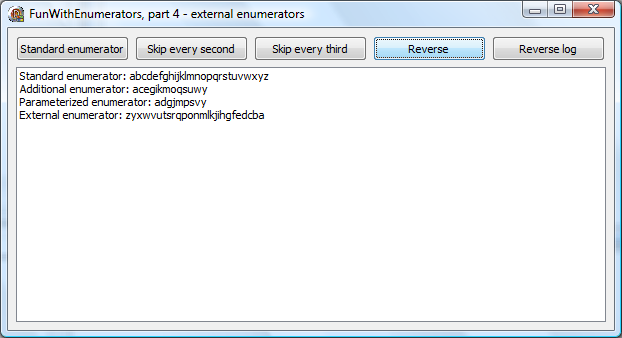
And here's a proof that EnumReversed really works.


It is maybe not obvious what really happens here, so let's take another look at this for..in loop - this time written as Delphi compiler implements it.

var
ln: string;
s: string;
enum: TStringsEnumReversed;
tmpIntf: IStringsEnumReversedFactory;
begin
ln := '';
tmpIntf := EnumReverse(FslTest);
enum := tmpIntf.GetEnumerator;
while enum.MoveNext do
ln := ln + enum.Current;
enum.Free;
lbLog.Items.Add('External enumerator: ' + ln);
tmpIntf := nil;
end;


As we've mentioned at the very beginning, this approach allows us to use enumerators on base classes (TStrings in our example), so here's a simple code that reverses items in the TListBox I'm using to display test results:

procedure TfrmFunWithEnumerators.btnReverseLogClick(Sender: TObject);
var
s : string;
sl: TStringList;
begin
sl := TStringList.Create;
for s in EnumReversed(lbLog.Items) do
sl.Add(s);
lbLog.Items.Assign(sl);
sl.Free;
end;


Result:


That's all for today. Tomorrow I'll show you another trick that will allow you to write for..in loop from the last example as for s in lbLog.Items.EnumReversed do.


Technorati tags: , ,

Wednesday, March 07, 2007

Fun with enumerators, part 3 - parameterized enumerators

[Part 1 - Introduction, Part 2 - Additional enumerators.]

In first two installments of this series, we took a look at for..in statement, described Delphi support for custom enumerators and demonstrated one possible way to add additional enumerator to a class that already implements one.

Today we'll implement a parameterized enumerator. Enumerators of this kind can be especially handy when used as filters. For example, an enumerator that takes a class reference as a parameter can be used to filter a TObjectList containing objects of many different classes.

IOW, we would like to write a following construct: for obj in list.Enum(TSomeClass) do. Clearly, Enum cannot be a property anymore, but it can be a function.

We can still use an enumerator factory object stored inside our class (as in the Part 2). Besides that, we must implement enumeration function that will take one or more parameters, preserve them inside the factory object and return the factory object so that Delphi compiler can call its GetEnumerator function.

Sounds complicated but in reality it really is simple.

First we have to add an internal factory object and an enumeration function to the TCustomStringList class.

  TCustomStringList = class(TStringList)
private
FEnumEveryNth: TCSLEnumEveryNthFactory;
public
constructor Create;
destructor Destroy; override;
function SkipEveryNth(skip: integer): TCSLEnumEveryNthFactory;
end;

constructor TCustomStringList.Create;
begin
inherited;
FEnumEveryNth := TCSLEnumEveryNthFactory.Create(Self);
end;

destructor TCustomStringList.Destroy;
begin
FEnumEveryNth.Free;
inherited;
end;

function TCustomStringList.SkipEveryNth(skip: integer): TCSLEnumEveryNthFactory;
begin
FEnumEveryNth.Skip := skip;
Result := FEnumEveryNth;
end;


Enumeration function SkipEveryNth takes one parameter and passes it to the factory object. Then it returns this factory object.


We also need a new factory class. This is an extended version of factory class from Part 2. It must implement storage for all enumerator parameters. In this case, this storage is implemented via property Skip.

  TCSLEnumEveryNthFactory = class
private
FOwner: TCustomStringList;
FSkip: integer;
public
constructor Create(owner: TCustomStringList);
function GetEnumerator: TCSLEnumEveryNth;
property Skip: integer read FSkip write FSkip;
end;

constructor TCSLEnumEveryNthFactory.Create(owner: TCustomStringList);
begin
inherited Create;
FOwner := owner;
FSkip := 1;
end;

function TCSLEnumEveryNthFactory.GetEnumerator: TCSLEnumEveryNth;
begin
Result := TCSLEnumEveryNth.Create(FOwner, FSkip);
end;


As you can see, GetEnumerator was also changed - in addition to passing FOwner to the created enumerator, it also passes current value of the Skip property.


New enumerator is very similar to the one from the Part 2, except that it advances list index by the specified ammount (instead of advancing it by 2).

  TCSLEnumEveryNth = class
private
FOwner: TCustomStringList;
FListIndex: integer;
FSkip: integer;
public
constructor Create(owner: TCustomStringList; skip: integer);
function GetCurrent: string;
function MoveNext: boolean;
property Current: string read GetCurrent;
end;

constructor TCSLEnumEveryNth.Create(owner: TCustomStringList; skip: integer);
begin
FOwner := owner;
FListIndex := -skip;
FSkip := skip;
end;

function TCSLEnumEveryNth.GetCurrent: string;
begin
Result := FOwner[FListIndex];
end;

function TCSLEnumEveryNth.MoveNext: boolean;
begin
Inc(FListIndex, FSkip);
Result := (FListIndex < FOwner.Count);
end;


We can now write some test code.

procedure TfrmFunWithEnumerators.btnSkipEveryThirdClick(Sender: TObject);
var
ln: string;
s : string;
begin
ln := '';
for s in FslTest.SkipEveryNth(3) do
ln := ln + s;
lbLog.Items.Add('Parameterized enumerator: ' + ln);
end;


Delphi compiler will translate this for..in roughly into

enumerator := FslTest.SkipEveryNth(3).GetEnumerator;
while enumerator.MoveNext do
ln := ln + enumerator.Current;
enumerator.Free;


So what is going on here?


  1. FslTest.SkipEveryNth(3) sets  FslTest.FEnumEveryNth.Skip to 3 and returns FslTest.FEnumEveryNth.

  2. Compiler calls FslTest.FEnumEveryNth.GetEnumerator.

  3. FslTest.FEnumEveryNth,GetEnumerator calls TCSLEnumEveryNth.Create(FslTest, 3) and returns newly created object.

  4. Enumerator loops until MoveNext returns false.


Test code result:


Tomorrow we'll do something even more interesting - we'll add new enumerator to existing class without creating a derived class.


Technorati tags: , ,

Delphi 2007 - New Vista dialogs

Delphi 2007 supports new-style Open/Save dialogs on Vista, allows you to configure new features in those dialogs and does it in a way that's compatible with older applications. Sadly, it only does two out of three things at once (admittedly, even that is a lot and more would be a pure magic).

If you know you'll be running on Vista, you can use new TFileOpenDialog (or TFileSaveDialog - everything I'll tell you about Open dialog holds also for Save dialog) which exposes new properties, such as FavoriteLinks and OkButtonLabel, and new options. But if you'll try to open this dialog on pre-Vista Windows, you'll only get an error message. (Still, that app will load fine up to the point when you actually try to display the dialog, so it is entirely possible to code two paths in your application, one using TFileOpenDialog if OS is Vista and another using TOpenDialog in all other cases.)

If you use TOpenDialog, you'll get an old-shool dialog, but it will work on all Windows.

And then there's a third possibility - you can use TOpenDialog while setting the global variable UseLatestCommonDialogs (declared in Dialogs.pas) to True. In that case, TOpenDialog will use new-style dialog on Vista and old-style dialog on older Windows. However, you'll not be able to specify any new Vista-only properties (like the OkButtonLabel I mentioned above).

In visual summary, your options are:

TOpenDialog

TOpenDialog +
UseLatestCommonDialogs

TFileOpenDialog

Vista
Windows XP

Besides file open/save dialogs, Delphi 2007 includes support for task dialogs. TTaskDialog components allows for simple creation of task dialogs, together with icons, expanded section, progress bar etc. Of course, it will only work on Windows Vista.


[I'm blogging about Spacely - the beta version of Delphi 2007 for Win32 - with special permission given from CodeGear.]

Technorati tags: , ,

Tuesday, March 06, 2007

Fun with enumerators, part 2 - multiple enumerators

In the first installment of this series, we just repeated some well-known facts about the for..in language construct and the implementation of enumerators. Today I'll show a way to implement additional enumerators for a class.

To start, let's write some test framework. Instead of creating a new class implementing an enumerator, we'll just inherit from the TStringList. That way, we get existing TStringList enumerator 'for free'.

TCustomStringList = class(TStringList)
end;


To make things simple, an instance of this class is initialized with one-letter strings from 'a' to 'z' in form's OnCreate handler.

procedure TfrmFunWithEnumerators.FormCreate(Sender: TObject);
var
ch: char;
begin
FslTest := TCustomStringList.Create;
for ch := 'a' to 'z' do
FslTest.Add(ch);
end;

procedure TfrmFunWithEnumerators.FormDestroy(Sender: TObject);
begin
FslTest.Free;
end;


To test it, we'll iterate over the list and collect all lines into a single line.

procedure TfrmFunWithEnumerators.btnStandardIteratorClick(Sender: TObject);
var
ln: string;
s : string;
begin
ln := '';
for s in FslTest do
ln := ln + s;
lbLog.Items.Add('Standard enumerator: ' + ln);
end;


And here's a result of this test code:


Standard enumerator


All good, all well, all very trivial. But our mission was not to test existing enumerator, but to add a new one. So let's take a look at the pseudo-code describing the inner working of the for..in implementation.

enumerator := list.GetEnumerator;
while enumerator.MoveNext do
//do something with enumerator.Current;
enumerator.Free;


The important fact is that enumerator is created directly from the parameter that is passed to the for..in construct (list, in our case). After that, this parameter is not needed anymore and for..in only operates on the enumerator.


To get a new behaviour, we have to provide a different enumerator. To do that, we have to pass a different object to the for..in loop. This object has to provide a GetEnumerator function, which the compiler will use to implement for..in.


In short, we need a factory class that will generate new enumerator and a property inside our main class that will provide this factory to the for..in loop.

  TCSLEnumEverySecondFactory = class
private
FOwner: TCustomStringList;
public
constructor Create(owner: TCustomStringList);
function GetEnumerator: TCSLEnumEverySecond;
end;

TCustomStringList = class(TStringList)
private
FEnumEverySecond: TCSLEnumEverySecondFactory;
public
constructor Create;
destructor Destroy; override;
property SkipEverySecond: TCSLEnumEverySecondFactory read FEnumEverySecond;
end;


Now we can write

procedure TfrmFunWithEnumerators.btnSkipEverySecondClick(Sender: TObject);
var
ln: string;
s : string;
begin
ln := '';
for s in FslTest.SkipEverySecond do
ln := ln + s;
lbLog.Items.Add('Additional enumerator: ' + ln);
end;


and Delphi compiler will translate it (approximately) into

enumerator := FslTest.SkipEverySecond.GetEnumerator;
while enumerator.MoveNext do
ln := ln + enumerator.Current;
enumerator.Free;


We have a winner! That's exactly what we wanted to achieve.


The other parts of the puzzle are simple. The SkipEverySecond factory can be created in the TCustomStringList constructor. We have to pass it Self object (for the reason we'll come to in a minute).

constructor TCustomStringList.Create;
begin
inherited;
FEnumEverySecond := TCSLEnumEverySecondFactory.Create(Self);
end;

destructor TCustomStringList.Destroy;
begin
FEnumEverySecond.Free;
inherited;
end;


The factory class is simple. It has to remember the owner (TCustomStringList) that was passed to the constructor so that it can pass it on to the enumerator whenever compiler requests one.

constructor TCSLEnumEverySecondFactory.Create(owner: TCustomStringList);
begin
inherited Create;
FOwner := owner;
end;

function TCSLEnumEverySecondFactory.GetEnumerator: TCSLEnumEverySecond;
begin
Result := TCSLEnumEverySecond.Create(FOwner);
end;


The enumerator is just a variation on a standard string list enumerator - it increments list index by 2 instead of 1 and skips every second item in the list. Yes, there is no rule saying that enumerator must return all entries in the enumerated object. In fact, you can be very creative inside the enumerator. We'll return to it some other day.

constructor TCSLEnumEverySecond.Create(owner: TCustomStringList);
begin
FOwner := owner;
FListIndex := -2;
end;

function TCSLEnumEverySecond.GetCurrent: string;
begin
Result := FOwner[FListIndex];
end;

function TCSLEnumEverySecond.MoveNext: boolean;
begin
Inc(FListIndex, 2);
Result := (FListIndex < FOwner.Count);
end;


And the results are ...


That wasn't so hard, wasn't it? Tomorrow we'll look into an even niftier topic - enumerators with parameters.


Technorati tags: , ,

Monday, March 05, 2007

Fun with enumerators, part 1

Iteration over containers (the 'for ... in' statement) is one of the nice things we Win32 developers got with the BDS 2005. I started using it reluctantly but recently I found out that I'm using and misusing it more and more. I started writing a short article on how to implement multiple enumerators in a class, but somehow it turned into a monster. At the moment I'm up to five parts but actually there may be more. You'll just have to wait and see.

If you don't know anything about for...in statement yet and you're running BDS 2005 or later, open up the help and locate Declarations and Statements topic. Inside the lengthy text (near the end), there's an Iteration Over Containers Using For statements subtopic that explains this theme. BDS 2006 users may simply click this link to open the subtopic in question.

This is not a tutorial on iteration, but still a short demo wouldn't hurt. Following simple program adds three items to a string list and then uses for...in construct to write those three lines out. Then it copies first line to a string and uses another for...in construct to iterate over all characters in the string. Output is shown just below the code.

program ForIteratorDemo;

{$APPTYPE CONSOLE}

uses
SysUtils,
Classes;

var
sl: TStringList;
s : string;
c : char;

begin
sl := TStringList.Create;
sl.Add('Line 1');
sl.Add('Line 2');
sl.Add('Line 3');
for s in sl do
Writeln(s);
s := sl[0];
for c in s do
Write(c, '.');
Writeln;
sl.Free;
Readln;
end.


How are enumerators made?


To iterate over something, the target must know how to create an enumerator. Enumerators are the mechanism used by the compiler to implement iterator support for any class, record or interface (in addition to some system types as sets and strings, where iterator support is built into the compiler).


Creating an enumerator is simple.The following instructions are copied directly from Delphi help:


To use the for-in loop construct on a class, the class must implement a prescribed collection pattern. A type that implements the collection pattern must have the following attributes:


  • The class must contain a public instance method called GetEnumerator(). The GetEnumerator() method must return a class, interface, or record type.

  • The class, interface, or record returned by GetEnumerator() must contain a public instance method called MoveNext(). The MoveNext() method must return a Boolean.

  • The class, interface, or record returned by GetEnumerator() must contain a public instance, read-only property called Current. The type of the Current property must be the type contained in the collection.


If the enumerator type returned by GetEnumerator() implements the IDisposable interface, the compiler will call the Dispose method of the type when the loop terminates.


For a practical demonstration, you can open Delphi's Classes.pas or, if you don't have Delphi sources or if you are still runnning pre-2005 Delphi, my own GpLists, which implements two enumerators. The one supporting for...in construct on the TGpIntegerList class is shown below.

type
TGpIntegerList = class;

TGpIntegerListEnumerator = class
private
ileIndex: integer;
ileList : TGpIntegerList;
public
constructor Create(aList: TGpIntegerList);
function GetCurrent: integer;
function MoveNext: boolean;
property Current: integer read GetCurrent;
end;

TGpIntegerList = class
//...
public
function GetEnumerator: TGpIntegerListEnumerator;
//...
end;

{ TGpIntegerListEnumerator }

constructor TGpIntegerListEnumerator.Create(aList: TGpIntegerList);
begin
inherited Create;
ileIndex := -1;
ileList := aList;
end;

function TGpIntegerListEnumerator.GetCurrent: integer;
begin
Result := ileList[ileIndex];
end;

function TGpIntegerListEnumerator.MoveNext: boolean;
begin
Result := ileIndex < (ileList.Count - 1);
if Result then
Inc(ileIndex);
end;

{ TGpIntegerList }

function TGpIntegerList.GetEnumerator: TGpIntegerListEnumerator;
begin
Result := TGpIntegerListEnumerator.Create(Self);
end;


The code is quite simple. TGpIntegerList implements GetEnumerator method, which creates an instance of the TGpIntegerListEnumerator class. That one in turn implements GetCurrent and MoveNext functions and Current property.


The trick when writing an enumerator is to keep in mind that MoveNext is called before the GetCurrent. You can assume that compiler-generated iteration loop looks very similar to this pseudocode:

enumerator := list.GetEnumerator;
while enumerator.MoveNext do
do something with enumerator.Current;
enumerator.Free;


Enough for today. You probably didn't learn anything new but that may change tomorrow when I'll work on a much more interesting task - how to add a second enumerator to a class that already implements one.


Technorati tags: , ,